

Index bloat is a pervasive and often hidden technical SEO issue where a website’s search index contains far too many low-value or irrelevant pages. This bloated index directly translates into a significant crawl budget problem for Googlebot, as it wastes time and resources crawling useless URLs. As SearchEngineLand frequently highlights, this efficiency drain reduces the rate at which important pages are discovered and indexed, severely impacting your site’s rankings and overall SEO performance due to chronic SEO index issues.
What Is Index Bloat?
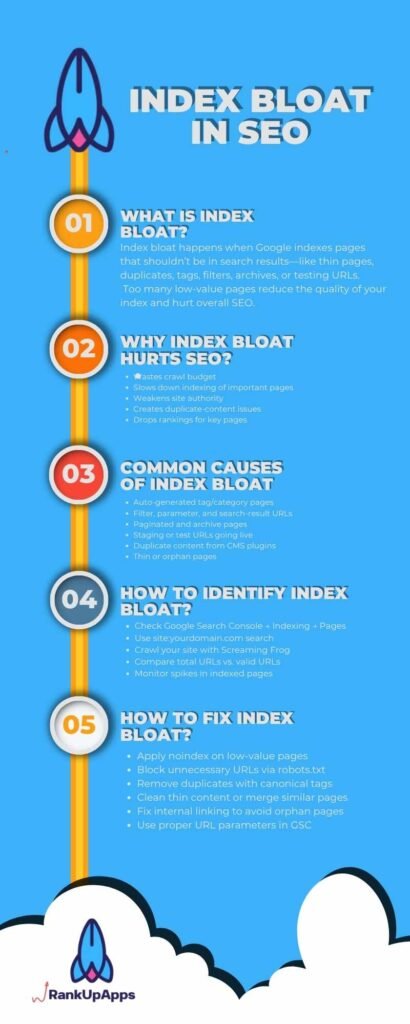
The index bloat meaning is straightforward: it occurs when a search engine, like Google, has indexed a disproportionately large number of low-value indexed pages relative to the amount of unique, high-quality content a site offers. Industry experts like GoInflow clearly define it as “too many low-value or unnecessary pages indexed” that hold no ranking potential and offer nothing of value to search users.
Search engine crawlers are aggressive link followers. They don’t inherently know which pages are important and which are not. They often pick up complex URLs generated by site features, such as e-commerce filters, internal search pages, and session tracking parameters, which create millions of unique URLs pointing back to the same, or extremely similar, core content. This leads directly to chronic SEO indexing issues.
When you suffer from index bloat, Google sees a large fraction of your site as low-quality. As noted by resources like DigitalGuider, this excess inventory leads to three major problems: wasted crawl budget, diluted site authority, and confusion about which version of duplicate content is the true canonical page. Your overall site quality score drops, making it harder for your best pages to rank.
Common Causes of Index Bloat
Index bloat rarely comes from a single source; it’s usually the accumulation of several site structure issues, all leading to duplicate index pages.
Automatically Generated Pages (Tags, Categories, Filters)
These are URLs created automatically by Content Management Systems (CMSs):
- Empty Tag Pages: Tags with one or zero posts.
- Duplicate Categories: A product listed under multiple, slightly different categories.
- Faceted Navigation: Every filter combination in e-commerce generates a unique URL (e.g., /products?size=\text{M} & \text{color}=\text{blue}).
Parameter URLs (UTMs, Sorting URLs)
These tracking and sorting mechanisms create unique URLs for the same page:
- URLs with UTM tracking codes (e.g., ?utm_source=\text{email}).
- Session IDs or user tracking parameters.
- Sorting parameters (e.g., ?sort=\text{price_asc}). These lead to massive parameter URLs indexing.
Thin Content Pages & Duplicate Content
Low-quality or redundant pages that should not be indexed:
- Auto-generated author archives or date-based archives.
- Disclaimer or policy pages that are replicated across subdomains.
- Pages with minimal text, often known as thin page indexing.
Paginated URLs & Infinite Scroll
Pagination for long lists, category pages, or blog archives:
- Pages 2, 3, and beyond of a category list (e.g., /category?page=2).
- Pages generated by server-side infinite scroll solutions.
Orphan Pages Accidentally Indexed
Pages not linked internally but which may have received a single external link, causing Google to discover and index them.
CMS/Plugin Auto-Generated URLs
Many plugins generate unnecessary URLs for internal functions, such as staging environments or XML feeds that are not intended for public search consumption.
How Index Bloat Hurts SEO Performance ?
The consequences of a bloated index are technical, financial, and competitive, causing significant index bloat SEO impact.
Wastes Crawl Budget
As SearchEngineLand stresses, Googlebot has a limited bandwidth for your site. When it spends time crawling thousands of pointless URLs, it directly wastes the crawl budget issues that should be reserved for your critical pages.
- Less frequent crawling of high-value pages.
- Increased server load from unnecessary bot activity.
Dilutes Ranking Signals
The authority, or link equity, your site earns gets spread thin across thousands of low-quality pages instead of concentrating on your top content. GoInflow stresses that this ranking dilution significantly impacts your quality score, making it harder for any individual page to rank highly.
Slows Down Indexing of Important Pages
If Googlebot’s queue is clogged with junk URLs, newly published, essential pages will take longer to be discovered, crawled, and indexed. This is known as slow indexing and delays your time-to-market for important content.
Impacts Overall Website Quality Signals
Google uses the overall indexed health of your site as a quality metric. A site with 80% bloat is perceived as low-quality, which can suppress the rankings of even your best pages.
How to Identify Index Bloat? (9-Step Technical Audit)
An effective index bloat audit follows a systematic approach to find unnecessary indexed pages and classify them.
Step 1 — Google Search Console → Pages Indexed
Check the main ‘Pages’ report under Indexing. If the count is significantly higher than the number of unique, quality URLs you know your site has, you have a problem.
Step 2 — Coverage Report: “Indexed, not submitted”
Look for URLs categorized as “Indexed, not submitted in sitemap.” These are pages Google found through links but which you haven’t prioritized—a strong sign of URL bloat.
Step 3 — Use site:domain.com Search
Use the site:domain.com search operator combined with URL fragments to manually spot bloat sources:
- site:example.com inurl:?sessionid
- site:example.com inurl:?sort
Step 4 — Compare XML Sitemaps vs Indexed Pages
The number of URLs in your XML sitemap should closely align with the number of valuable pages indexed. If the indexed count is 5\times your sitemap count, you have bloat.
Step 5 — Screaming Frog / Sitebulb Crawl
Run a full site crawl to identify and filter URLs by content type, thinness, and URL structure.
Step 6 — Check Duplicate URLs
Use SEO crawl tools or GSC to locate pages flagged for duplicate content or title tags.
Step 7 — Review Parameter URLs
Identify the most common parameters that are generating new URLs (e.g., ref, page, filter).
Step 8 — Analyze Log Files
(Advanced) Log file analysis shows exactly where Googlebot is spending its time—confirming if it’s wasting 80% of its crawl on junk URLs.
Step 9 — Find Orphan Pages
Use a crawl tool (like Screaming Frog) to identify pages that are indexed but have no internal links pointing to them.
How to Fix Index Bloat ? (Complete Technical Action Plan)
| Tool | Primary Purpose | Bloat Insight |
| GSC | Index Coverage | Overall index size & status flags |
| Site Search | Manual Check | Find specific parameter URLs indexed |
| Screaming Frog | Site Crawl | Duplicate content & thin page identification |
To fix index bloat and improve crawl efficiency, you must adopt a multi-pronged SEO technical fixes approach.
Noindex Low-Value and Auto-Generated Pages
For pages that users need to access but you don’t want Google to rank:
- Action: Implement a <meta name=”robots” content=”noindex, follow”> tag in the page head.
- Target: Thank you pages, internal search results, filter pages that offer no unique value, and thin archive pages.
Block Irrelevant URLs in robots.txt
For entire sections that should never be crawled:
- Action: Use the Disallow directive in your robots.txt file.
- Target: Staging/development environments, unnecessary script folders, and internal admin areas.
Mini-Checklist:
Disallow: /staging/
Disallow: /wp-admin/
Disallow: /*?sessionid
Use Canonical Tags for Duplicate Pages
For multiple URLs pointing to the same content:
- Action: Implement the <link rel=”canonical” href=”[preferred URL]”> tag on all duplicate versions.
- Target: URL parameters (UTMs, sort options), HTTP/HTTPS duplicates, or trailing slash variations.
Clean Up Pagination & Faceted Navigation
This is crucial for e-commerce sites:
- Action: Use noindex on paginated pages (page=2, 3, etc.) and canonicalize them to the main view, or ensure the faceted navigation generates minimal indexable URLs using AJAX or parameter controls.
Delete or Merge Thin Content Pages
If a page has no future value:
- Action: Delete the page and implement a 301 redirect to the most relevant category or parent page.
- Target: Extremely thin content, old promotional pages, or expired content.
Improve Internal Linking to Prioritize Important URLs
Google uses internal links as a map. Stop linking to the low-value URLs:
- Action: Audit your internal links and ensure the highest authority pages link only to other valuable pages.
- Goal: Direct link equity away from URLs you want to remove unnecessary pages from index.
Remove Old, Expired, or Orphan Content
Proactively manage your content lifecycle:
- Action: For old, irrelevant content, use the 301 redirect strategy. For pages that were indexed by accident and have no links, use the GSC Removal Tool followed by a noindex tag.
Optimize XML Sitemaps
Your sitemaps must only contain URLs you want to rank:
- Action: Remove all URLs that have noindex tags, are canonicalized elsewhere, or are otherwise low-value. A clean sitemap improves crawl efficiency.
Set Proper URL Parameter Rules in GSC
Use the GSC URL Parameters Tool:
- Action: Instruct Google how to handle specific parameters (e.g., tell Google that the sort parameter does not change the content and should be ignored).
Best Practices to Prevent Index Bloat Permanently
Prevention is always better than fixing a massive bloated index. These SEO best practices ensure long-term index management.
Conduct Monthly/Quarterly Index Audits
Schedule recurring checks of your GSC Index Coverage report. This ongoing monitoring allows you to catch and fix new bloat sources before they grow out of control.
Keep Your CMS Clean (Avoid Auto-Generated Junk)
Configure your CMS (WordPress, Shopify, etc.) to automatically apply noindex to archives, author pages, media pages, and other default low-value content types.
Maintain a Strong URL Structure
Plan your clean index strategy from the ground up. Use logical folder structures and avoid introducing unnecessary query parameters for tracking when better methods (like client-side JavaScript) are available.
Index Only High-Value Search Intent Pages
Before creating a new page or URL, ask: “Does this page serve a unique search intent that could lead to a conversion?” If the answer is no, apply a noindex or canonical tag by default.
Case Study: How Fixing Index Bloat Improved Rankings
The Problem (Thousands of Tag Pages Indexed)
A large blog website found it had over 50,000 indexed URLs, but only 10,000 were valuable articles. The remaining 40,000 were single-post tag and archive pages. This was causing a severe better crawl rate bottleneck and ranking recovery issues.
The Fix (Noindex + Canonical + Sitemap Cleanup)
The site implemented a sitewide rule to apply a noindex, follow directive to all tag pages. They then removed these 40,000 URLs from the XML sitemap.
The Result (Faster Crawling + Higher Visibility)
Within four weeks, the total indexed count dropped by nearly 65%. Googlebot’s crawl activity on the core, high-value articles increased by 80%, leading to faster indexing of new content and a 12% increase in overall organic visibility—a clear demonstration of SEO improvement via technical fixes.
Key Takeaways — Manage Your Index Like a Pro
This index bloat summary provides the essential crawl budget optimization checklist:
- Audit First: Identify bloat sources using GSC and site: operator searches.
- Be Ruthless: If a page offers no unique ranking value, control it immediately.
- Canonicals for Duplicates: Use canonical tags to consolidate link equity.
- Noindex for Necessity: Use noindex for necessary but non-ranking pages (e.g., filtered views).
- Robots.txt for Waste: Block entire folders of junk content from being crawled.
- Clean Sitemaps: Your XML sitemap must only contain URLs you want to rank.
Conclusion — A Clean Index = Stronger SEO Performance
Addressing index bloat is not just a cleanup task; it’s a fundamental investment in your site’s health. Achieving a clean index SEO environment ensures every resource Google allocates to your domain is spent on content that matters. By embracing continuous index optimization and regular auditing, you can guarantee superior resource allocation, leading directly to sustainable and measurable SEO performance improvement.